File Manager for iPhone5.0.8
Publisher Description
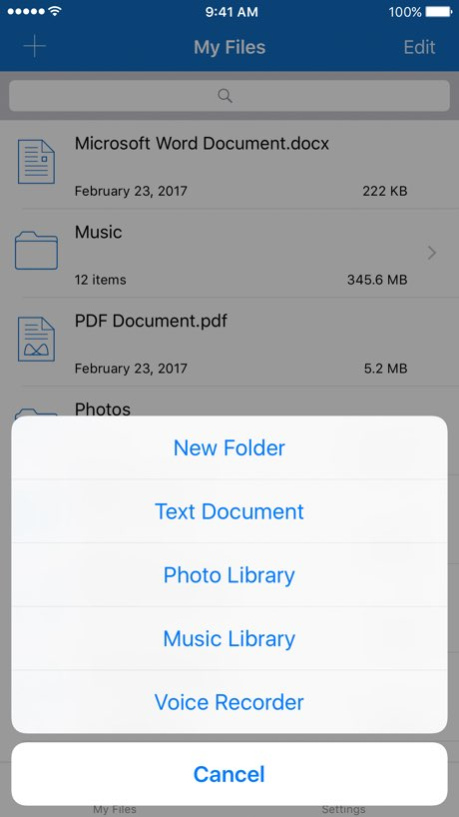


File Manager for iPhone - an app, that combines the functions of the archiver, media player and document manager
. Main Features:
- Support 3D Touch
- Cloud services: iCloud Drive, Dropbox, Google Drive, Yandex.Disk
- Exporting files to: iCloud Drive, Dropbox, Google Drive, Yandex.Disk
- Built-in search
- Syncing files via iTunes or Wi-Fi
- Import attachments from Mail and Safari
- Creating folders, copying, moving, deleting, renaming files
- Sort by name, date, type
- Import music, photos and videos
- Capture photos and videos
- Sending archives via Mail
- Saving photos and videos
- Creating text documents
- Build-in voice recorder for creating voice notes
- Protecting your data with a passcode or Touch ID
. Archiver:
- Support rar and zip archives
- Creating zip archives: option to set a password, compression method and archive name
- Extracting files from the archive to the specified folder
. Photo Viewer:
- Supported image formats: png, jpg, tif, tiff, gif, bmp
- Slideshow support
- Share photos to Facebook, Twitter and via Mail
. Music Player:
- Support various of audio formats: flac, ape, wma, mp3, m4a, aac, ogg, aif
- Support background playback, control music from the lock screen or control center
- Support metadata and lyrics (available for mp3, m4a and aif formats)
- Shuffle and repeat music
- Sleep Timer
- Saving position of playback
. Video Player:
- Support audio codec Dolby (AC3, E-AC3)
- Hardware acceleration H.264
- Support various video formats: mp4, mov, m4v, avi, wmv, rmvb, flv, f4v, mkv, dat, vob, mts, mpg, 3gp, m2ts, asf, mpeg4, ts, rm
- DRM protected videos are not supported
- Aspect ratio: default, 4:3, 5:4, 16:9, 16:10, 2.21:1
- AirPlay and TV Out
- Support built-in and external subtitles
- Support built-in audio tracks
- Support gestures
- Playback speed: 0.5X to 2.0X
- Ability to set brightness, contrast and saturation
- Move to next/previous video
- Saving position of playback
- Orientation lock while watching a video
. Document Viewer:
- PDF. Including password-protected PDF
- Microsoft Word Documents: doc and docx
- Text documents: txt, rtf
Version History • Minor changes in video player 5.0.8 06/30/2017 • Fixed bug with sorting files 5.0.7 06/01/2017 • Fixed bug with displaying lyrics of songs in the music player
• Fixed bug with picking external subtitle file
• Fixed bug with displaying external subtitles
• Fixed bug with opening Word documents 5.0.6 05/28/2017 • Support has been added Peek and Pop for images, PDF and text documents
• Fixed bugs with Home Screen Quick Actions 5.0.5 05/04/2017 • Bug fixes 5.0.4 04/21/2017 • Support has been added Peek and Pop for images
• Fixed bug with copying and moving files and folders
• Fixed bug with renaming folders
• Fixed bug with deleting multiple files from Yandex.Disk 5.0.3 04/19/2017 • Fixed bug with saving photos and videos to camera roll 5.0.2 04/13/2017 • Support has been added auto detection encoding in text editor
• Fixed bugs with video and text editor settings
• Fixed bug with loading settings for built-in and external subtitles
• Fixed bugs with external subtitles picker 5.0.1 04/08/2017 - General:
• Support has been added 3D Touch
• Support has been added iOS 10
• Support has been added Yandex Disk
• Dropbox, Google Drive and Yandex Disk now supports: download/ upload multiple files, remove multiple files and creating folders
• Settings tab now has sections for easy navigation
• Support has been added for show/ hide files extensions
• On iOS 10.3 fixed bug with unarchive files from 7z archives
• Fixed crash while extracting files from .rar archive
• Support has been added for set up complex or simple passcode
• Support has been added copy and paste text/ images from clipboard
• Support has been added import multiple photos and videos at once
• Support has been added import multiple audio files at once
• Support has been added voice recorder
• Support has been added send multiple archives via Mail
• Support has been added saving multiple photos and videos from "Open In" menu
• Text editor now supports different text encodings, fonts and font sizes
• Photo viewer now supports swipe down to dismiss
- Music Player:
• Support has been added sleep timer
• Support has been added remember playback position
– Video Player:
• Support has been added background audio playback
• For subtitles support has been added font, font size and text color 5.0 04/05/2017 • Fix some bugs 4.0.7 04/21/2016 • Fix some bugs 4.0.6 04/17/2016 • Fixed bugs with 7z archives
• Fixed crash on iOS 8 4.0.5 04/06/2016 • Fix some bugs 4.0.4 04/04/2016 • All-new Icon
• Fix localization issues
• Support has been added for OneDrive 4.0.3 11/08/2015 • Fix some bugs 4.0.2 10/26/2015 • Fix some bugs 4.0.1 10/17/2015 • New audio player. The "mini player" will allow You to work with Your content and listen to music simultaneously
• Improved support for Word and PDF documents
• Added support for network services: FTP, WebDAV, Windows SMB
• Improved support for archives
• Access to music library to import the music
• Other fixes and improvements 4.0 10/09/2015 • Fix some bugs 3.0.9 06/10/2015 • Redesign audio and video player
• Lock orientation in video player 3.0.8 05/29/2015 • Fixed bug with video player 3.0.7 05/11/2015 • Support has been added for viewing ePub 3.0.6 04/20/2015 • Fix some bugs 3.0.5 03/31/2015 • Support has been added for landscape mode in music player
• Fixed bugs with Bluetooth
• Fixed bugs with the UI 3.0.4 03/22/2015 • Improved work with Yandex.Disk
• Support has been added for landscape mode 3.0.3 03/13/2015 • General fixes 3.0.2 03/02/2015
About File Manager for iPhone
The company that develops File Manager for iPhone is Sergej Kachalo. The latest version released by its developer is 5.0.8.
To install File Manager for iPhone on your iOS device, just click the green Continue To App button above to start the installation process. The app is listed on our website since 2026-10-13 and was downloaded 8 times. We have already checked if the download link is safe, however for your own protection we recommend that you scan the downloaded app with your antivirus. Your antivirus may detect the File Manager for iPhone as malware if the download link is broken.
How to install File Manager for iPhone on your iOS device:
- Click on the Continue To App button on our website. This will redirect you to the App Store.
- Once the File Manager for iPhone is shown in the iTunes listing of your iOS device, you can start its download and installation. Tap on the GET button to the right of the app to start downloading it.
- If you are not logged-in the iOS appstore app, you'll be prompted for your your Apple ID and/or password.
- After File Manager for iPhone is downloaded, you'll see an INSTALL button to the right. Tap on it to start the actual installation of the iOS app.
- Once installation is finished you can tap on the OPEN button to start it. Its icon will also be added to your device home screen.
Program Details
System requirements
Download information
Pricing
Version History
version 5.0.8
posted on 2026-10-13
Version History • Minor changes in video player 5.0.8 06/30/2017 • Fixed bug with sorting files 5.0.7 06/01/2017 • Fixed bug with displaying lyrics of songs in the music player
• Fixed bug with picking external subtitle file
• Fixed bug with displaying external subtitles
• Fixed bug with opening Word documents 5.0.6 05/28/2017 • Support has been added Peek and Pop for images, PDF and text documents
• Fixed bugs with Home Screen Quick Actions 5.0.5 05/04/2017 • Bug fixes 5.0.4 04/21/2017 • Support has been added Peek and Pop for images
• Fixed bug with copying and moving files and folders
• Fixed bug with renaming folders
• Fixed bug with deleting multiple files from Yandex.Disk 5.0.3 04/19/2017 • Fixed bug with saving photos and videos to camera roll 5.0.2 04/13/2017 • Support has been added auto detection encoding in text editor
• Fixed bugs with video and text editor settings
• Fixed bug with loading settings for built-in and external subtitles
• Fixed bugs with external subtitles picker 5.0.1 04/08/2017 - General:
• Support has been added 3D Touch
• Support has been added iOS 10
• Support has been added Yandex Disk
• Dropbox, Google Drive and Yandex Disk now supports: download/ upload multiple files, remove multiple files and creating folders
• Settings tab now has sections for easy navigation
• Support has been added for show/ hide files extensions
• On iOS 10.3 fixed bug with unarchive files from 7z archives
• Fixed crash while extracting files from .rar archive
• Support has been added for set up complex or simple passcode
• Support has been added copy and paste text/ images from clipboard
• Support has been added import multiple photos and videos at once
• Support has been added import multiple audio files at once
• Support has been added voice recorder
• Support has been added send multiple archives via Mail
• Support has been added saving multiple photos and videos from "Open In" menu
• Text editor now supports different text encodings, fonts and font sizes
• Photo viewer now supports swipe down to dismiss
- Music Player:
• Support has been added sleep timer
• Support has been added remember playback position
– Video Player:
• Support has been added background audio playback
• For subtitles support has been added font, font size and text color 5.0 04/05/2017 • Fix some bugs 4.0.7 04/21/2016 • Fix some bugs 4.0.6 04/17/2016 • Fixed bugs with 7z archives
• Fixed crash on iOS 8 4.0.5 04/06/2016 • Fix some bugs 4.0.4 04/04/2016 • All-new Icon
• Fix localization issues
• Support has been added for OneDrive 4.0.3 11/08/2015 • Fix some bugs 4.0.2 10/26/2015 • Fix some bugs 4.0.1 10/17/2015 • New audio player. The "mini player" will allow You to work with Your content and listen to music simultaneously
• Improved support for Word and PDF documents
• Added support for network services: FTP, WebDAV, Windows SMB
• Improved support for archives
• Access to music library to import the music
• Other fixes and improvements 4.0 10/09/2015 • Fix some bugs 3.0.9 06/10/2015 • Redesign audio and video player
• Lock orientation in video player 3.0.8 05/29/2015 • Fixed bug with video player 3.0.7 05/11/2015 • Support has been added for viewing ePub 3.0.6 04/20/2015 • Fix some bugs 3.0.5 03/31/2015 • Support has been added for landscape mode in music player
• Fixed bugs with Bluetooth
• Fixed bugs with the UI 3.0.4 03/22/2015 • Improved work with Yandex.Disk
• Support has been added for landscape mode 3.0.3 03/13/2015 • General fixes 3.0.2 03/02/2015
version 5.0.8
posted on 2026-09-04
Version History This app has been updated by Apple to prepare for watchOS 27 compatibility. No new features are included.
• Minor changes in video player 5.0.8 06/30/2017 • Fixed bug with sorting files 5.0.7 06/01/2017 • Fixed bug with displaying lyrics of songs in the music player
• Fixed bug with picking external subtitle file
• Fixed bug with displaying external subtitles
• Fixed bug with opening Word documents 5.0.6 05/28/2017 • Support has been added Peek and Pop for images, PDF and text documents
• Fixed bugs with Home Screen Quick Actions 5.0.5 05/04/2017 • Bug fixes 5.0.4 04/21/2017 • Support has been added Peek and Pop for images
• Fixed bug with copying and moving files and folders
• Fixed bug with renaming folders
• Fixed bug with deleting multiple files from Yandex.Disk 5.0.3 04/19/2017 • Fixed bug with saving photos and videos to camera roll 5.0.2 04/13/2017 • Support has been added auto detection encoding in text editor
• Fixed bugs with video and text editor settings
• Fixed bug with loading settings for built-in and external subtitles
• Fixed bugs with external subtitles picker 5.0.1 04/08/2017 - General:
• Support has been added 3D Touch
• Support has been added iOS 10
• Support has been added Yandex Disk
• Dropbox, Google Drive and Yandex Disk now supports: download/ upload multiple files, remove multiple files and creating folders
• Settings tab now has sections for easy navigation
• Support has been added for show/ hide files extensions
• On iOS 10.3 fixed bug with unarchive files from 7z archives
• Fixed crash while extracting files from .rar archive
• Support has been added for set up complex or simple passcode
• Support has been added copy and paste text/ images from clipboard
• Support has been added import multiple photos and videos at once
• Support has been added import multiple audio files at once
• Support has been added voice recorder
• Support has been added send multiple archives via Mail
• Support has been added saving multiple photos and videos from "Open In" menu
• Text editor now supports different text encodings, fonts and font sizes
• Photo viewer now supports swipe down to dismiss
- Music Player:
• Support has been added sleep timer
• Support has been added remember playback position
– Video Player:
• Support has been added background audio playback
• For subtitles support has been added font, font size and text color 5.0 04/05/2017 • Fix some bugs 4.0.7 04/21/2016 • Fix some bugs 4.0.6 04/17/2016 • Fixed bugs with 7z archives
• Fixed crash on iOS 8 4.0.5 04/06/2016 • Fix some bugs 4.0.4 04/04/2016 • All-new Icon
• Fix localization issues
• Support has been added for OneDrive 4.0.3 11/08/2015 • Fix some bugs 4.0.2 10/26/2015 • Fix some bugs 4.0.1 10/17/2015 • New audio player. The "mini player" will allow You to work with Your content and listen to music simultaneously
• Improved support for Word and PDF documents
• Added support for network services: FTP, WebDAV, Windows SMB
• Improved support for archives
• Access to music library to import the music
• Other fixes and improvements 4.0 10/09/2015 • Fix some bugs 3.0.9 06/10/2015 • Redesign audio and video player
• Lock orientation in video player 3.0.8 05/29/2015 • Fixed bug with video player 3.0.7 05/11/2015 • Support has been added for viewing ePub 3.0.6 04/20/2015 • Fix some bugs 3.0.5 03/31/2015 • Support has been added for landscape mode in music player
• Fixed bugs with Bluetooth
• Fixed bugs with the UI 3.0.4 03/22/2015 • Improved work with Yandex.Disk
• Support has been added for landscape mode 3.0.3 03/13/2015 • General fixes 3.0.2 03/02/2015
version 5.0.8
posted on 2026-08-22
Version History This update from Apple will improve the functionality of this app. No new features are included.
• Minor changes in video player 5.0.8 06/30/2017 • Fixed bug with sorting files 5.0.7 06/01/2017 • Fixed bug with displaying lyrics of songs in the music player
• Fixed bug with picking external subtitle file
• Fixed bug with displaying external subtitles
• Fixed bug with opening Word documents 5.0.6 05/28/2017 • Support has been added Peek and Pop for images, PDF and text documents
• Fixed bugs with Home Screen Quick Actions 5.0.5 05/04/2017 • Bug fixes 5.0.4 04/21/2017 • Support has been added Peek and Pop for images
• Fixed bug with copying and moving files and folders
• Fixed bug with renaming folders
• Fixed bug with deleting multiple files from Yandex.Disk 5.0.3 04/19/2017 • Fixed bug with saving photos and videos to camera roll 5.0.2 04/13/2017 • Support has been added auto detection encoding in text editor
• Fixed bugs with video and text editor settings
• Fixed bug with loading settings for built-in and external subtitles
• Fixed bugs with external subtitles picker 5.0.1 04/08/2017 - General:
• Support has been added 3D Touch
• Support has been added iOS 10
• Support has been added Yandex Disk
• Dropbox, Google Drive and Yandex Disk now supports: download/ upload multiple files, remove multiple files and creating folders
• Settings tab now has sections for easy navigation
• Support has been added for show/ hide files extensions
• On iOS 10.3 fixed bug with unarchive files from 7z archives
• Fixed crash while extracting files from .rar archive
• Support has been added for set up complex or simple passcode
• Support has been added copy and paste text/ images from clipboard
• Support has been added import multiple photos and videos at once
• Support has been added import multiple audio files at once
• Support has been added voice recorder
• Support has been added send multiple archives via Mail
• Support has been added saving multiple photos and videos from "Open In" menu
• Text editor now supports different text encodings, fonts and font sizes
• Photo viewer now supports swipe down to dismiss
- Music Player:
• Support has been added sleep timer
• Support has been added remember playback position
– Video Player:
• Support has been added background audio playback
• For subtitles support has been added font, font size and text color 5.0 04/05/2017 • Fix some bugs 4.0.7 04/21/2016 • Fix some bugs 4.0.6 04/17/2016 • Fixed bugs with 7z archives
• Fixed crash on iOS 8 4.0.5 04/06/2016 • Fix some bugs 4.0.4 04/04/2016 • All-new Icon
• Fix localization issues
• Support has been added for OneDrive 4.0.3 11/08/2015 • Fix some bugs 4.0.2 10/26/2015 • Fix some bugs 4.0.1 10/17/2015 • New audio player. The "mini player" will allow You to work with Your content and listen to music simultaneously
• Improved support for Word and PDF documents
• Added support for network services: FTP, WebDAV, Windows SMB
• Improved support for archives
• Access to music library to import the music
• Other fixes and improvements 4.0 10/09/2015 • Fix some bugs 3.0.9 06/10/2015 • Redesign audio and video player
• Lock orientation in video player 3.0.8 05/29/2015 • Fixed bug with video player 3.0.7 05/11/2015 • Support has been added for viewing ePub 3.0.6 04/20/2015 • Fix some bugs 3.0.5 03/31/2015 • Support has been added for landscape mode in music player
• Fixed bugs with Bluetooth
• Fixed bugs with the UI 3.0.4 03/22/2015 • Improved work with Yandex.Disk
• Support has been added for landscape mode 3.0.3 03/13/2015 • General fixes 3.0.2 03/02/2015
version 5.0.8
posted on 2017-06-30
Jun 30, 2017 Version 5.0.8
This app has been updated by Apple to display the Apple Watch app icon.
• Minor changes in video player
version 5.0.8
posted on 2017-06-30
30 Jun 2017 Version 5.0.8
This app has been updated by Apple to use the latest Apple signing certificate.
• Minor changes in video player
version 5.0.8
posted on 2017-06-30
Jun 30, 2017 Version 5.0.8
This app has been updated by Apple to use the latest Apple signing certificate.
• Minor changes in video player
version 5.0.8
posted on 2017-06-30
Jun 30, 2017 Version 5.0.8
• Minor changes in video player
version 5.0.8
posted on 2017-06-30
This app has been updated by Apple to display the Apple Watch app icon.
• Minor changes in video player
version 4.0.7
posted on 2014-04-13
version 5.0.8
posted on 1970-01-01
2017年6月30日 Version 5.0.8
• Minor changes in video player
